

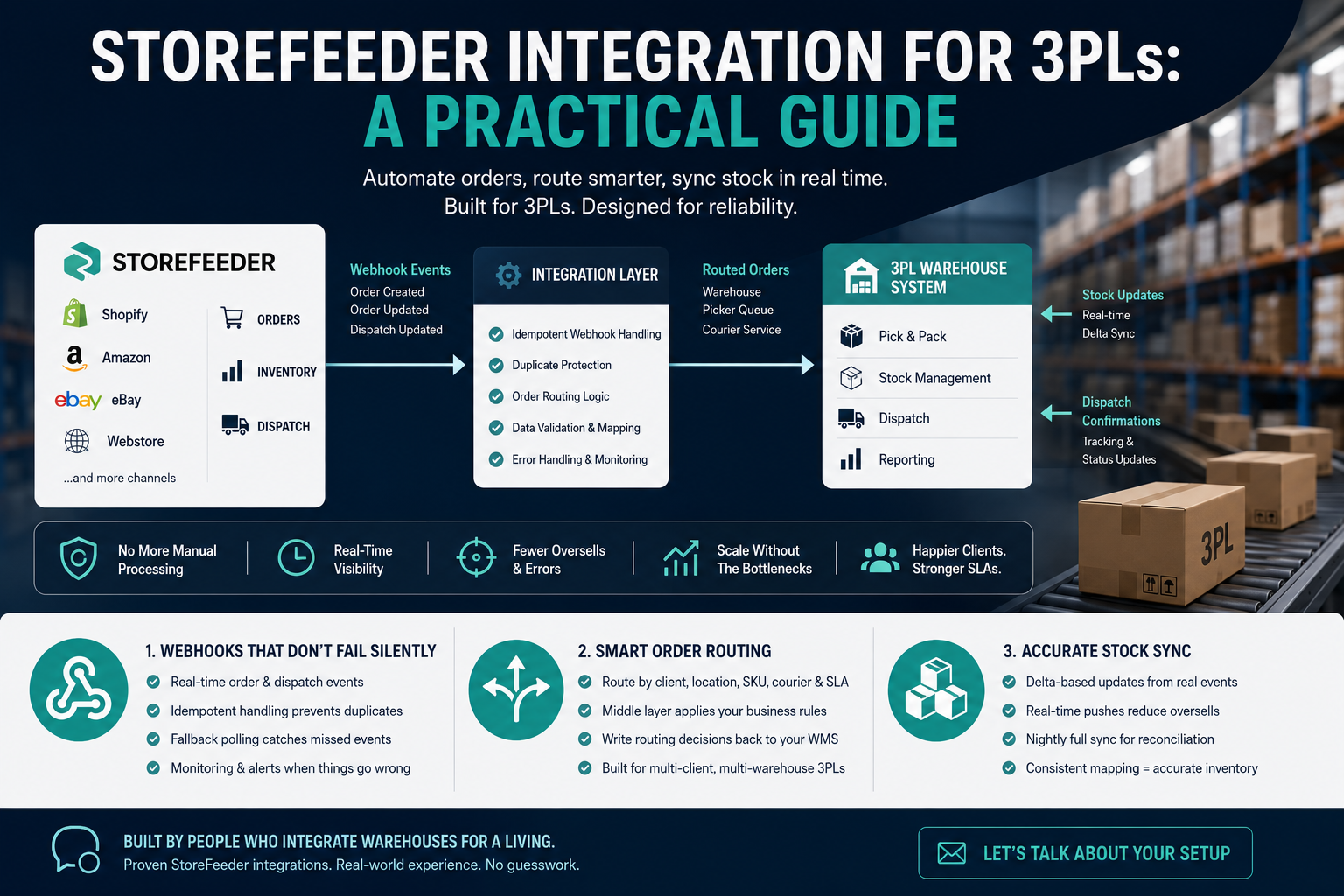
If you run a 3PL and your clients sell through StoreFeeder, at some point you'll need proper StoreFeeder integration into your warehouse system, not just someone logging in and manually processing orders. Most of the 3PLs we talk to start with a person checking a StoreFeeder dashboard each morning. That works until you're handling four clients and three hundred orders a day, at which point it becomes the bottleneck.
This post covers the three things that actually matter when you connect StoreFeeder to a warehouse management system or custom fulfilment platform: webhooks, order routing, and stock sync. We've built this kind of integration for multiple 3PLs, including the multi-retailer setup we did for Kukoon, so this is written from what actually goes wrong, not from the API docs.
What StoreFeeder integration actually involves for a 3PL
StoreFeeder is an order and inventory management platform. It sits between your clients' sales channels (Shopify, Amazon, eBay, their own site) and pulls everything into one place. For a 3PL, the integration job is to get orders out of StoreFeeder and into your warehouse system reliably, and to push stock levels and dispatch confirmations back the other way.
That sounds simple. It isn't, because StoreFeeder was built primarily for retailers managing their own stock, not for 3PLs managing stock on behalf of multiple clients across shared or dedicated warehouse locations. The API and webhook model works, but you have to design around a few assumptions that don't hold in a 3PL context.
Webhook setup for StoreFeeder integration
StoreFeeder supports webhooks for order creation, order updates, and dispatch events. Setting these up is straightforward in the portal: you register an endpoint, choose which events you want, and StoreFeeder posts JSON payloads to your listener as things happen. That's the easy 20% of the work.
The harder 80% is handling what StoreFeeder actually sends you in practice, which is not always what the documentation implies.
The duplicate delivery problem
StoreFeeder's webhook delivery is at-least-once, not exactly-once. Under load, or after a timeout on your end, it will retry. If your endpoint doesn't respond within the expected window, or your server is mid-deploy, you'll get the same order event twice, sometimes three times, several minutes apart. If your integration isn't idempotent, this creates duplicate picking tasks in your WMS, or worse, duplicate stock deductions.
The fix is simple but easy to skip under deadline pressure: every webhook payload needs to be checked against an order ID and event type you've already processed before you act on it. Store a processed-events table, check it first, discard duplicates silently. This is a five-minute conversation in a spec but a real bug if it's missed, and it's the single most common issue we see in half-built StoreFeeder integrations.
Fallback polling still matters
Webhooks can silently stop firing, usually after a StoreFeeder account setting change or an SSL certificate rotation on your endpoint that nobody flagged. Don't rely on webhooks alone for anything order-critical. Run a polling job every 15 to 30 minutes that checks for orders StoreFeeder shows as unprocessed on your end, as a safety net. It costs almost nothing and it's saved more than one client from missed dispatches over a bank holiday weekend.
Order routing: getting orders to the right warehouse and courier
Once orders land, the next problem is routing. If you're running a single warehouse for a single client, this is trivial. Most 3PLs aren't in that position. You're routing by client, sometimes by SKU location within a client's stock, and by courier service level based on weight, destination, and what the customer paid for at checkout.
StoreFeeder does have warehouse and courier rule configuration built in, but the rules engine is designed around a retailer with one operation, not a 3PL running rule sets for a dozen different clients with different SLAs. The practical approach we use is to let StoreFeeder handle channel-level order capture and basic validation, then apply the real routing logic in a middle layer that we build and control, usually via the StoreFeeder API rather than the built-in rules screen. That layer decides warehouse, picker queue, and courier, then writes the result back into your WMS or custom fulfilment platform.
This is exactly the pattern we used on the Kukoon integration: orders coming in from multiple retail channels needed to be routed and stock-checked against rules that no off-the-shelf configuration screen could express cleanly. Building that logic outside StoreFeeder, connected via API, gave far more control than trying to bend StoreFeeder's native rules to fit.
Stock level sync: where oversells actually come from
Stock sync is where most StoreFeeder integrations quietly fail, and it's rarely because the sync doesn't run. It's because of timing and mapping.
The reliable pattern is delta-based stock pushes triggered by actual warehouse events (goods-in, pick confirmation, dispatch) rather than a scheduled full resync. Full resyncs are useful as a nightly reconciliation check, not as your primary sync mechanism.
What this actually costs to build properly
A basic StoreFeeder integration, order pull plus stock push with no routing logic, is a few days of development work. A proper implementation with idempotent webhook handling, client-specific routing rules, and real-time stock sync typically runs into several weeks, depending on how many warehouse systems and client rule sets you're connecting into. It's worth treating this as infrastructure, not a quick script, because the cost of getting it wrong is oversells, missed SLAs, and client complaints, which cost far more in support time than the build did.
If you're planning a StoreFeeder integration and want it built properly the first time, with webhook handling, routing logic, and stock sync that won't fall over at volume, get in touch with us and we'll talk through what your setup actually needs.