

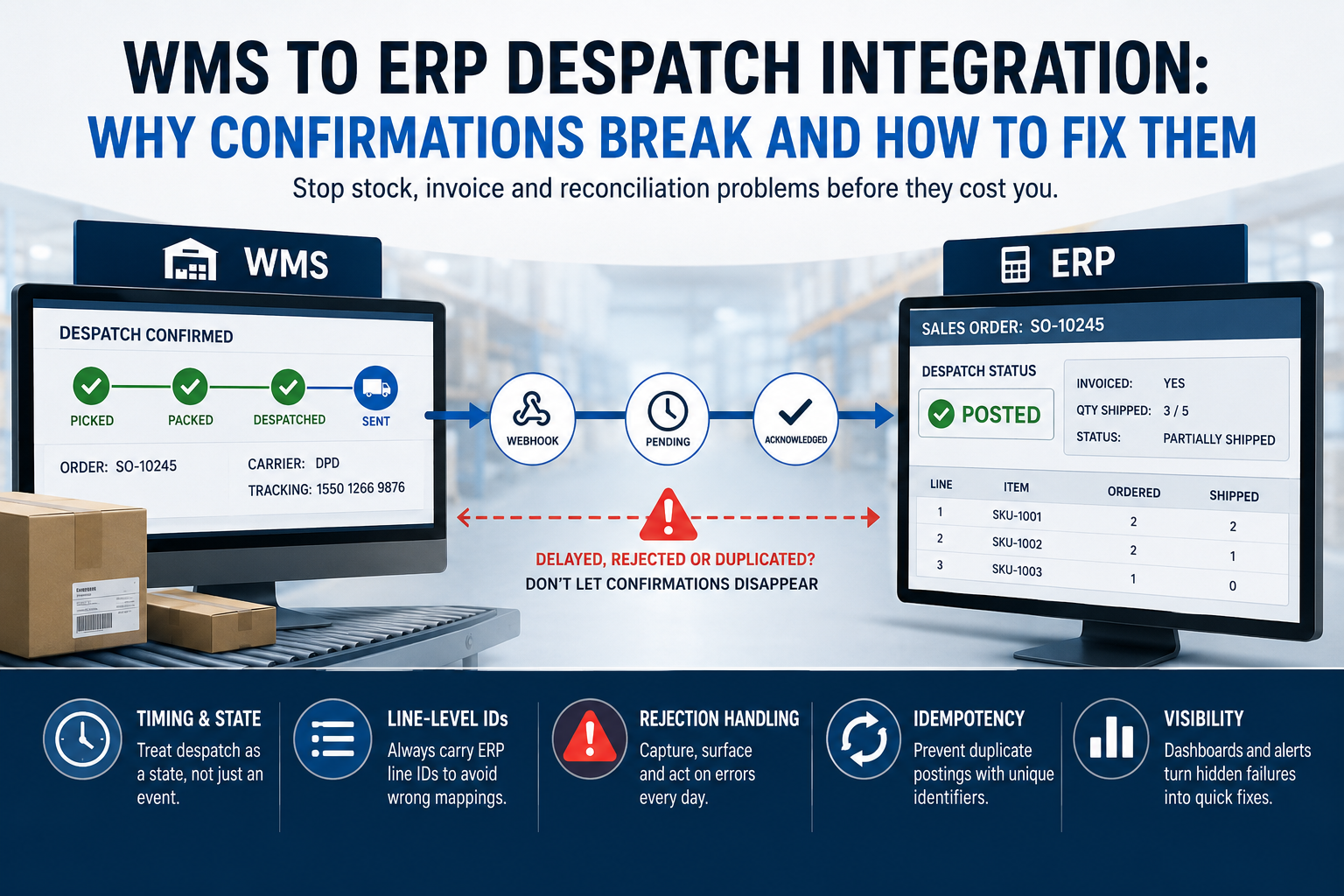
Every fulfilment operation eventually hits the same wall: the warehouse says an order has gone out, but the ERP disagrees, or doesn't know yet, or knows something slightly different. Get WMS ERP despatch integration wrong and you end up with stock that's physically gone but still shows as available, invoices raised for goods that were never shipped, and a finance team chasing figures that don't reconcile. This isn't an edge case. It's the default state unless someone has deliberately designed for it.
We've built this integration more times than we can count, between Mintsoft, Linnworks and StoreFeeder on the warehouse side, and Business Central, Sage and various bespoke systems on the finance side. The mechanics look simple on a whiteboard: pick, pack, despatch, confirm, done. In practice, three things break it repeatedly: timing, partial fulfilment, and rejection handling. We'll take each in turn.
The timing problem in WMS ERP despatch integration
Most WMS platforms fire a despatch event the moment a shipment is marked as sent, often via webhook. The ERP, meanwhile, might be polling every fifteen minutes, or worse, waiting for a nightly batch. In that gap, anything can happen: a customer service rep processes a return against a sales order that the ERP still thinks is open, or a credit control system chases payment on an order that's already shipped and should have triggered an invoice.
The fix isn't just making things happen in real time, though that helps. It's making the two systems agree on what "despatched" actually means as a state, not just an event. We treat despatch confirmation as a state transition with its own audit trail: pending, sent, acknowledged, posted. If the ERP hasn't acknowledged within an expected window (we typically set this at 10 to 15 minutes for API-based flows), that's a monitoring alert, not a silent failure. Silent failures are what turn into a Friday afternoon reconciliation problem three weeks later.
Partial despatches: the mapping trap nobody warns you about
Full order, full shipment, clean confirmation: easy. The problem is partial despatches, and they're far more common than most people expect once you're running multi-carrier or multi-location fulfilment.
Here's the gotcha we see most often. Developers map despatch lines back to the ERP sales order using SKU and quantity, because that's what the WMS payload gives them cleanly. This works fine until an order has the same SKU on two separate lines, which happens more than you'd think with promotional bundles, back-ordered items being re-added, or manually amended orders. When that happens, quantity-and-SKU matching can post the despatch against the wrong order line. The ERP accepts it without complaint because nothing about the data looks invalid, it's just wrong. You won't spot this until someone querying stock valuation notices the numbers don't add up.
The fix is to always carry the ERP's own line identifier (not just SKU) through the entire fulfilment chain, from order import into the WMS, through pick and pack, back out again on despatch. That means your order import mapping needs to preserve line-level IDs even when the WMS itself doesn't require them for picking. It's a small amount of extra plumbing at build time that saves a genuinely painful debugging session later. This is exactly the kind of data-mapping decision we get right early when we scope an API and systems integration project, because retrofitting it after go-live means touching data that's already live in two systems.
For partial despatches specifically, decide upfront whether the ERP invoices per shipment or waits for the order to fully complete. Both are valid business decisions, but the integration has to know which one it's building for. We handled this directly on a project for Lama Fulfilment, where multiple partial shipments per order needed to reconcile cleanly against Sage without duplicate invoicing.
What happens when the ERP rejects the confirmation
This is the part most integrations skip, and it's the one that causes the most damage. Rejections happen for mundane reasons: the sales order was already closed manually, the quantity despatched exceeds what's outstanding, a customer account was put on hold between order and despatch, or a rounding difference of 0.01 units trips a validation rule in the ERP that nobody remembers exists. Business Central in particular will reject a despatch posting outright if the quantity to ship marginally exceeds the outstanding quantity, which sounds like an edge case until you're dealing with WMS-side unit conversions that introduce floating-point drift.
The naive integration treats every despatch confirmation as fire-and-forget: send it, assume success, move on. When the ERP rejects it, that despatch just disappears. Nobody in the warehouse knows. Nobody in finance knows, until stock and financial records diverge enough to notice.
What you actually need is a dead-letter queue, or at minimum a rejected-transactions table with enough context to act on: the order reference, the despatch payload, the ERP's error response, and a timestamp. Someone in operations needs to see this daily, not discover it during month-end reconciliation. For higher-volume operations we build a small internal dashboard for exactly this, surfacing failed postings with a retry action, which turns a hidden data integrity problem into a five-minute daily task. We built something similar for CK Fulfilment, where the client portal surfaces exceptions that would otherwise sit unnoticed in a log file.
Idempotency matters more than people think
Webhooks retry. If your WMS sends a despatch confirmation and doesn't get a 200 response quickly enough, most platforms will resend it, sometimes two or three times with exponential backoff. If your ERP-side handler isn't idempotent, meaning it doesn't check whether that specific despatch has already been posted, you'll get duplicate postings: double-decremented stock, duplicate invoices, or both. Every despatch confirmation needs a unique, stable identifier that the receiving system checks against before processing, not after. This is a five-line check in code and a genuinely common cause of stock discrepancies when it's missing.
Building it properly the first time
None of this is exotic engineering. It's careful design: state machines instead of fire-and-forget events, line-level IDs instead of SKU matching, visible rejection handling instead of silent failure, and idempotency checks on every write. The cost of getting it right at build time is a few extra days of scoping and testing. The cost of getting it wrong is stock discrepancies that take a warehouse manager and a finance controller half a day each to untangle, repeated monthly, indefinitely.
If your WMS and ERP are currently held together by CSV exports and someone manually checking two screens, that's not a process, it's a risk sitting quietly in your operations. We'd rather talk about it before it becomes a reconciliation problem than after. Get in touch and we'll walk through what a properly built despatch integration would look like for your systems.